
Billing
Documents, due dates, and essential billing-cycle checks.
Last updated: 2026-09-15
Permissions for viewing, sending and payments
View billing (no. 1023) allows operators to view invoices and the payments recorded against each document, open and download PDFs, resend documents and send customer reminders, including available bulk actions. It also allows viewing document commissions when the Resellers module is enabled. This permission therefore includes sending communications: check recipients and payment status before confirming.
Accounting reports and payment list (no. 1025) allows economic summaries, accounting reports, tabular exports and the general payment list, including disputed payments and related exports. It is not required to open invoices, reach them from a customer record, view payments recorded against an individual document or send PDFs and reminders. Invoice PDFs, including merged files, remain available with permission 1023.
Recording receipts also requires Insert payments (no. 1152). This permission covers individual entries, instalment payments, bulk settlement and importing receipts from files. On the invoice page, payments, entry fields and the action for linking a payment to an instalment remain visible even without permission 1152. Clicking Add payment without this permission displays a message with the missing permission number and description; no payment is recorded. Existing options for customer notification and proforma conversion upon payment remain available; it does not allow changing document lines, deleting or reversing payments, initiating gateway charges or sending documents to SDI.
Creating, saving, duplicating and deleting documents, as well as deleting or reversing payments, requires Edit billing (no. 1024). Settings have separate permissions. For an operator who records receipts from an invoice, assign View billing and Insert payments; add permission 1025 only if they need the general payment list or its import controls: the new permission must be explicitly enabled in existing roles and is not included in the Read only selection command. Access-denied messages show the number to search for in role management.
The document lifecycle
Billing connects customer records, services, billing periods, due dates, documents, and payments. It is not an isolated area: an incorrect customer or service value can flow into the invoice, electronic file, and customer communication.
The operating path normally covers customer verification, accrued services or billable items, document creation, line entry, tax checks, saving, possible XML generation, collection, and reconciliation.
Where to start
The customer Invoices tab lists proformas, invoices, and credit notes. The fiscal-year filter limits the list, while the summary calculates document count, net, VAT, and gross amounts.
The same page contains Billable items. These are entries prepared for later billing and must not be confused with issued documents.
Choose the document type
New document offers Proforma, Invoice, and Credit note. The choice changes numbering and accounting meaning. Do not use a credit note merely as a negative invoice, and do not treat a proforma as a tax invoice.
In the example, Invoice was selected. ISP Billing proposed the invoice series, next fiscal-year number, current date, and a thirty-day due date; each value still requires an operator check.
Initial document data
Before the first save, check the customer, document type, number, year, issue date, due date, and payment mode. Payment mode describes the expected channel; it does not record that payment has occurred.
Save and continue creates the header and opens the full editor. The document now exists even when its lines are empty, so do not leave it unintentionally at zero.
Customer tax data
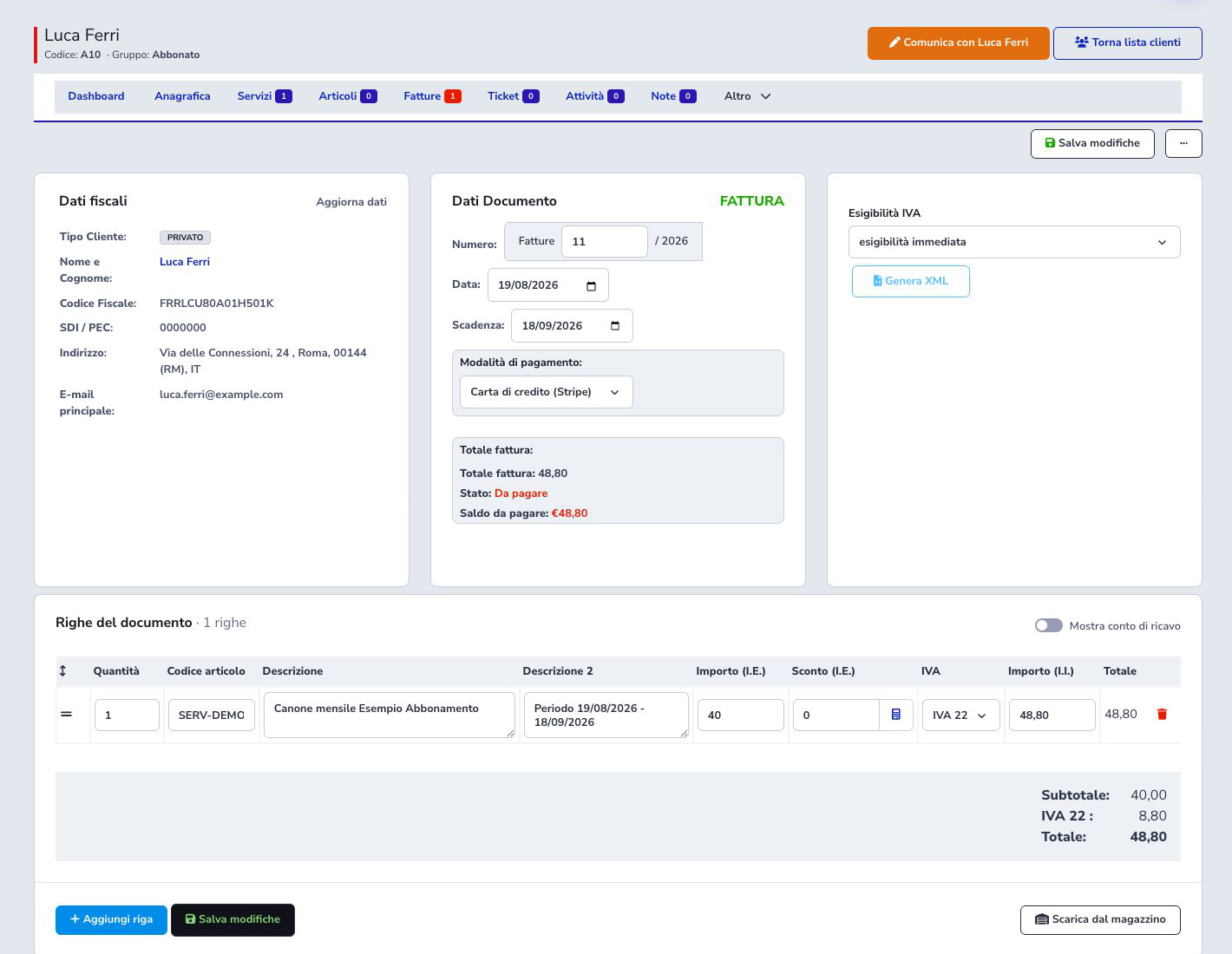
The editor displays customer type, name, tax identifiers, SDI/PEC, address, and primary email. Verify these values before producing XML or sending the document.
Use Update data deliberately when the customer record was corrected after document creation.
Enter document lines
Each line includes quantity, product code, descriptions, net amount, discount, tax rate, gross amount, and total. A useful description identifies both the service and billing period.
For example, a quantity of 1 with a €40.00 net unit price and 22% VAT produces €8.80 tax and a €48.80 gross amount. Always let the form recalculate the totals and verify rounding instead of copying the example values into an unrelated document.
Net, VAT, and gross
Check both monetary inputs on the line. In the tested interface, after entering the net value the gross field also had to be verified before the summary updated from zero to €48.80. Confirm subtotal, VAT by rate, and total.
Also compare Invoice total and Balance due. Do not send or collect a document while these values disagree.
Saving and the Unpaid state
Save changes stores header and lines. A document without associated payments remains unpaid and its balance equals its total.
“Credit card (Stripe)” identifies the intended payment channel; it does not make the invoice paid. Status changes only after a valid collection or accounting entry.
Payments, instalments, and references
The Payments area accepts amount, mode, date, transaction reference, and notes. Use it for a real, reconcilable collection, not to simulate customer intent. The reference should trace back to the gateway, bank, or cash record.
Use payment instalments when the balance is split across due dates. Instalments must add up exactly to the document total. Once a proforma has been converted, manage lines, due dates, and payments from the linked invoice: operational data remains aligned while each document keeps its own number, type, and date.
Document actions
The editor provides PDF, download, communication, duplication, collection, and deletion actions. Some affect only format or delivery; others have permanent administrative effects.
Generate XML prepares the electronic document, but generation, validation, and transmission are separate events and must be tracked independently.
Core settings, supplier, and numbering
Before issuing documents, configure the supplier identity printed in invoices, fiscal identifiers, registered address, contacts, document series, current year, next number, payment terms, due-date behavior, PDF template, logos, and standard texts.
Reconcile every numbering change with the fiscal year and the last document actually issued. Test a draft PDF with long customer data and several lines, inspect page breaks and totals, and keep commercial wording separate from mandatory fiscal data. A new annual sequence must not overwrite, duplicate, or silently skip identifiers required by the organization’s process.
VAT rates and fiscal nature
Configure every VAT rate with its percentage, description, fiscal nature or exemption information where required, and the behavior expected by electronic invoicing. Use the same approved definition consistently in customer defaults, services, billable items, and manually entered lines.
Test documents containing one and several rates and verify taxable base, tax, gross total, rounding, XML mapping, and PDF wording. Do not delete or repurpose a rate already referenced by issued records; create a new version when fiscal treatment changes and obtain professional validation for tax decisions.
Billable items
Billable items are prepared invoice lines generated by services, usage, activities, adjustments, or manual operations. Before conversion, verify customer, source, billing period, description, quantity, unit price, discount, VAT, recurring context, and whether another item already represents the same charge.
Edit or exclude incorrect items before they enter a fiscal document. Conversion must preserve source traceability so that an operator can move from the invoice line back to the service or process that produced it.
Publish drafts and bulk operations
Draft publication provides a preview stage for validating customer data, numbering, dates, payment terms, lines, taxes, totals, and delivery settings before documents become operational. Resolve validation errors individually rather than publishing a batch whose source data is uncertain.
If another operator publishes or changes the same document while the page is open, saving is stopped. Reload the page, verify the current number and state, and repeat only the changes that are still required. Do not force the temporary number shown by an old draft or start concurrent publication actions for the same document.
Bulk PDF delivery, reseller-fee computation, publication, export, and date-range deletion require narrow filters and a reviewed record count. Reopen a sample from the result and verify history and status. Deletion is not a substitute for a required credit note and must not remove documents that must be retained.
Payments, imports, and exports
Payments support single/bulk entry, standard and Atono CSV imports, controlled deletion, filters, and aggregates. Reconcile invoice, customer, amount, date, method, and reference. Background exports cover invoices, payments, cashbook, accounting, postal formats, Poste Italiane, and merged PDFs and remain temporary.
Automatic capture and payment deadlines
Eligible payment terms can be collected through an automatic gateway when the customer method, provider configuration, mandate or authorization, amount, currency, and due date satisfy the selected integration. Suspend capture blocks the automatic attempt without cancelling the invoice; the list labels the document as Capture suspended and keeps it searchable with the other unpaid documents. Capture payment starts the supported provider flow and may remain asynchronous.
If the provider rejects a manual attempt, the system shows the available reason instead of falsely confirming that capture started. The capture scheduler processes eligible terms according to its configuration. Verify the provider result, recorded payment, remaining balance, document state, retry policy, and any fee before treating collection as complete. Never repeat an uncertain request without first checking whether the provider already accepted it.
Reminders and communications
Separate templates can cover invoice issue, successful payment, upcoming or overdue reminders, and other supported events. Configure subject, body, sender, channel, variables, customer-area or payment link, and language for each communication.
When manually sending one invoice or reminder, contact details where the customer disabled invoice alerts remain visible but are not selected. If the customer expressly requests that specific document, the operator can authorize an exception for that send only; the customer’s preference remains disabled. Bulk sends, including WhatsApp Meta to the main number, always exclude contact details where invoice alerts are not active.
When a communication contains Pay now, its protected link identifies the invoice and follows the payment method assigned to that document. With Stripe credit card or TS Pay, it opens the relevant provider checkout directly. With another method, it opens the Customer Area payment page; customers who are not already authenticated must sign in before continuing.
Reminder schedules drive the configured alert levels, such as reminder 1, 2, and 3. Before activation, test timing around the due date, paid and partially paid documents, suspended customers, recipient preferences, and holidays or grace periods. Check the current payment state immediately before sending so that a settled invoice is not chased.
Deletion logs
Each document deleted from the Dashboard creates a Document entry, visible in both the customer log and the general log. The Account and Date columns identify the operator and time; the description identifies the deleted document and its number.
Bulk deletion creates one entry per document, explicitly marked as a bulk deletion. Document references remain readable after deletion. API deletions are marked as performed through the API, with System in the Account column. An entry records a completed deletion; cancelled operations do not leave a deletion confirmation.
This applies to new deletions and does not reconstruct deletions performed before this log was introduced.
Mandates and SDD groups
Mandates can be filtered and exported. SDD groups collect eligible invoices, expose their rows, generate/download files, track status and sent state, and support controlled regeneration or deletion. Verify creditor, mandate, sequence, due dates, and total and never submit a regenerated group twice.
With Mark as paid, select the document statuses to include and the payment date. After confirmation, the row shows Recording payments and the number of processed documents. Actions that modify that group are disabled while the operation is active; XML download remains available. The status remains visible after reloading the page, and another operation on the same group cannot start until processing ends.
When processing ends, invoice counts refresh and the latest outcome shows its date, processed documents, registered payments, documents already paid or already recorded, and documents to review. If processing is interrupted or documents require review, open the invoices and check their payments before repeating the operation: a payment may have been recorded before a later step encountered a problem. If the start confirmation or progress is unavailable, wait for an update and check the group before trying again.
Electronic documents and XML groups
Electronic documents support XML creation, download, state, regeneration, deletion, and transmission. Groups provide archives, Mexal CSV, asynchronous sending, and status; the error log retains rejected operations. Correct source data before refreshing the customer snapshot and never force an unconfirmed delivery state.
Credit notes, duplication, and refunds
Create a credit note through the dedicated action so it retains the original-document reference. A duplicate is an editable starting point. Gateway refund and credit note are separate: one returns funds and the other corrects the fiscal document.
Final checklist
- Complete and current customer tax data
- Correct type, series, number, and year
- Consistent issue, service-period, and due dates
- Descriptions understandable outside the application
- Verified quantity, discount, and net amount
- Correct VAT rate on each line
- Matching subtotal, VAT, total, and balance
- Payment mode matching the agreement
- No payment recorded without a real collection
- XML, sending, and notifications only after final review