
Edge Agent: installation, security, and operation
Install and pair an Edge Agent, assign it to modules, then manage verification, alerts, updates, and revocation.
Last updated: 2026-08-26
Purpose
Edge Agent creates an operational point inside a POP, data center, or private network. Through an outbound connection it performs ping, TCP/HTTP, SNMP, discovery, SSH, UISP adoption, and Proxmox Console according to installed capabilities. It is shared infrastructure, not a customer service.
Create and install
Create name, site, and description, then generate the one-time command and run it on an always-on machine inside the target network. The installer detects platform and architecture, downloads the authorized binary, pairs the token, and configures automatic startup.
Windows x64, macOS Apple Silicon/Intel, and Linux x64/ARM64 are supported. Linux prefers a system-level systemd service; user or nohup fallbacks provide different persistence guarantees. The same removal command supports both Linux architectures.
Verify and assign
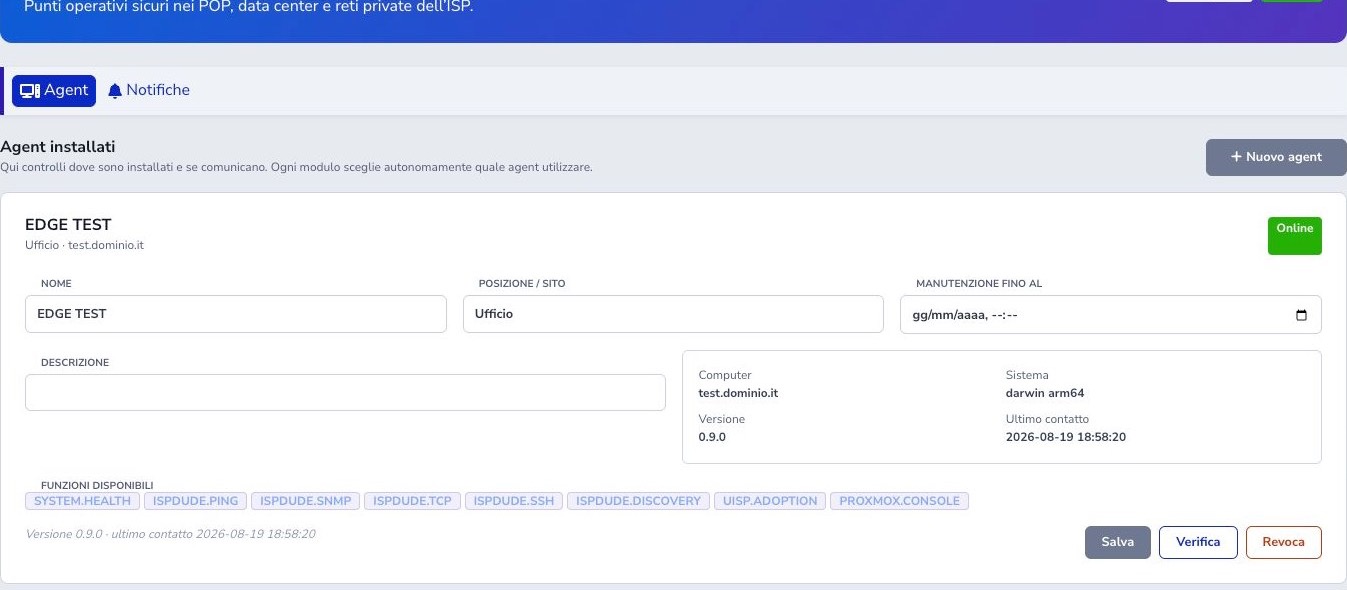
Wait for Online, inspect hostname, system, version, and capabilities, then run Verify. Assign the Agent in the appropriate ISP Dude Environment or module only afterward. Online without the required capability cannot execute that function.
Multiple sites and maintenance
An ISP may register multiple Agents for independent POPs. ISP Dude assigns one to the Environment rather than individual devices. Maintenance suppresses offline false alarms during planned work but does not automatically disable every module action.
Agent offline notifications
Notification settings define how long an Agent may remain silent before it is considered offline, who receives WhatsApp, email, or push alerts, and whether recovery generates a second notification. Choose a threshold longer than ordinary heartbeat jitter but short enough for the site’s operational needs.
During planned host, network, or power work, use maintenance to suppress false offline incidents. After maintenance, confirm that heartbeats resume and that recovery is recorded. An offline Agent means its private-network operations are unavailable; it does not by itself prove that every monitored device is down.
Remote update
A remote update instructs the online Agent to download an authenticated package. The binary is accepted only after its SHA-256 digest matches the expected value, and the previous version is retained locally to support recovery.
Check platform, architecture, current version, and site maintenance window before starting. The operation is complete only when the Agent restarts and a heartbeat reports the expected version and capabilities. If it does not return, use the host’s local service controls and retained binary rather than repeatedly launching updates.
SSH and privileged operations
ISP Dude SSH requires an online capable Agent and write permission, and the target must already belong to the tenant inventory. Credentials and terminal data are transient. Discovery and UISP adoption require 2FA; every Proxmox Console opening requires fresh 2FA and audit events.
Revoke and remove
Revoke immediately invalidates the token. Then run the displayed platform removal command to stop the service and delete local binary, configuration, and logs. Migrate dependent Environments and modules before revocation.
Checklist
- Install inside the reachable network
- Use an always-on host
- Wait for Online and Verify
- Check version and capabilities
- Assign it in the correct module
- Configure maintenance and alerts
- Confirm return online after update
- Protect SSH and 2FA
- Migrate dependencies before revoke
- Remove the local service