
ISP Message: internal chat and customer WhatsApp inbox
Chat with ISP operators, share CRM customer references, and manage Meta WhatsApp conversations in one interface.
Last updated: 2026-08-19
Internal chat
Select a colleague, read history, and send text, quick replies, emoji, or a structured CRM customer reference. Read counters, polling, push notifications, and per-account sound preference support ongoing work. Permissions still control the shared customer page.
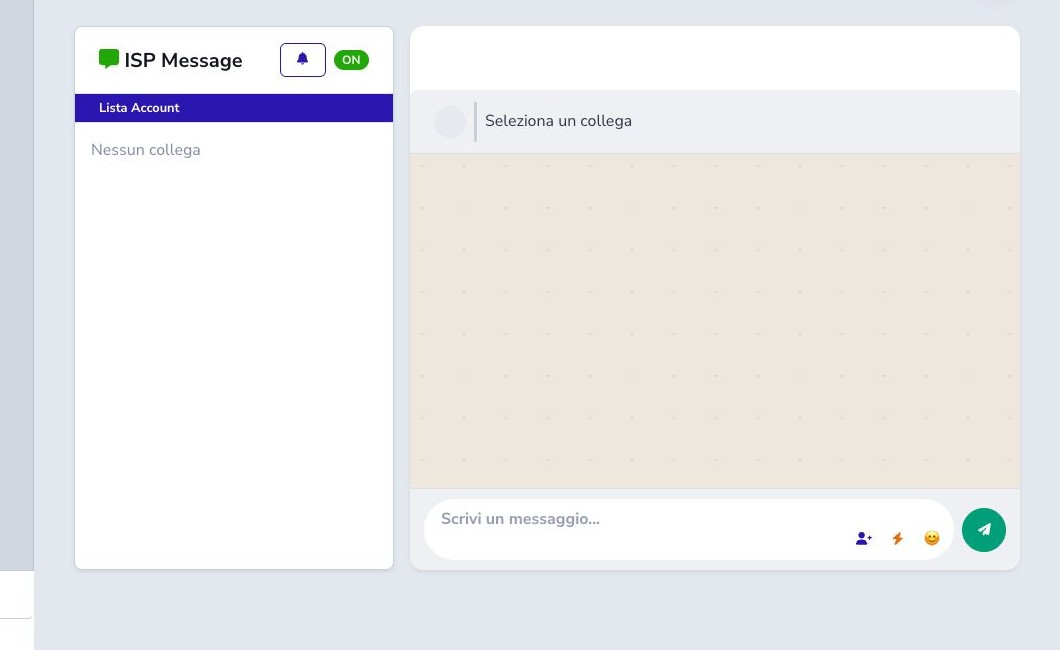
Quick replies, emoji, and sound
Quick replies insert prepared text into the composer; they do not send until the operator confirms. Review recipient and wording, especially after switching conversations. The bell stores the current account’s sound preference. Browser audio restrictions may require interaction and do not affect unread counters.
Meta customer inbox
When official Meta is enabled, the Customers tab searches CRM-linked phone conversations and displays inbound/outbound messages, status, templates, buttons, and protected image/video/audio/document media. Opening can mark the conversation read; deletion removes local history and must be deliberate.
24-hour service window
Free-form replies are permitted only while Meta’s customer-service window is open. Outside it, use the approved template workflow instead of forcing text. Validate customer, phone, consent, window badge, and provider result.
Ticket mirroring and protected media
If the conversation is linked to a still-open ticket, an ISP Message reply is mirrored into that ticket. The association follows the latest inbound reference and does not attach replies to an arbitrary historical ticket. Check the ticket badge whenever context is uncertain.
Meta media is delivered through a protected route that validates tenant, conversation, and allowed file. Never expose the storage path or replace it with a public URL. Diagnose authorization, file presence, and MIME type if an attachment cannot be opened.
Counters, polling, and diagnosis
Unread counters remain separate for colleague chats and customer conversations. Opening explicitly marks the selected thread read; background polling only refreshes data. If counters stop updating, check session, permissions, Meta enablement, webhook state, and page visibility before sending any diagnostic message.
Checklist
- Separate colleague and customer conversations
- Verify the recipient
- Share CRM references, never secrets
- Review quick replies
- Protect customer media
- Respect the Meta window
- Use templates outside the window
- Check unread counters and webhooks