
MessageNet: accounts, numbers, and portability
Configure MessageNet and manage remote profiles, documents, URI lines, credit, and number portability.
Last updated: 2026-09-23
MessageNet and VoIP responsibilities
MessageNet manages the provider-side customer profile, documents, URI lines, geographic numbers, credit, and portability. The VoIP module continues to manage local DIDs, profiles, CDRs, and billing. Synchronization and explicit links connect the two.
Connection and contract setup
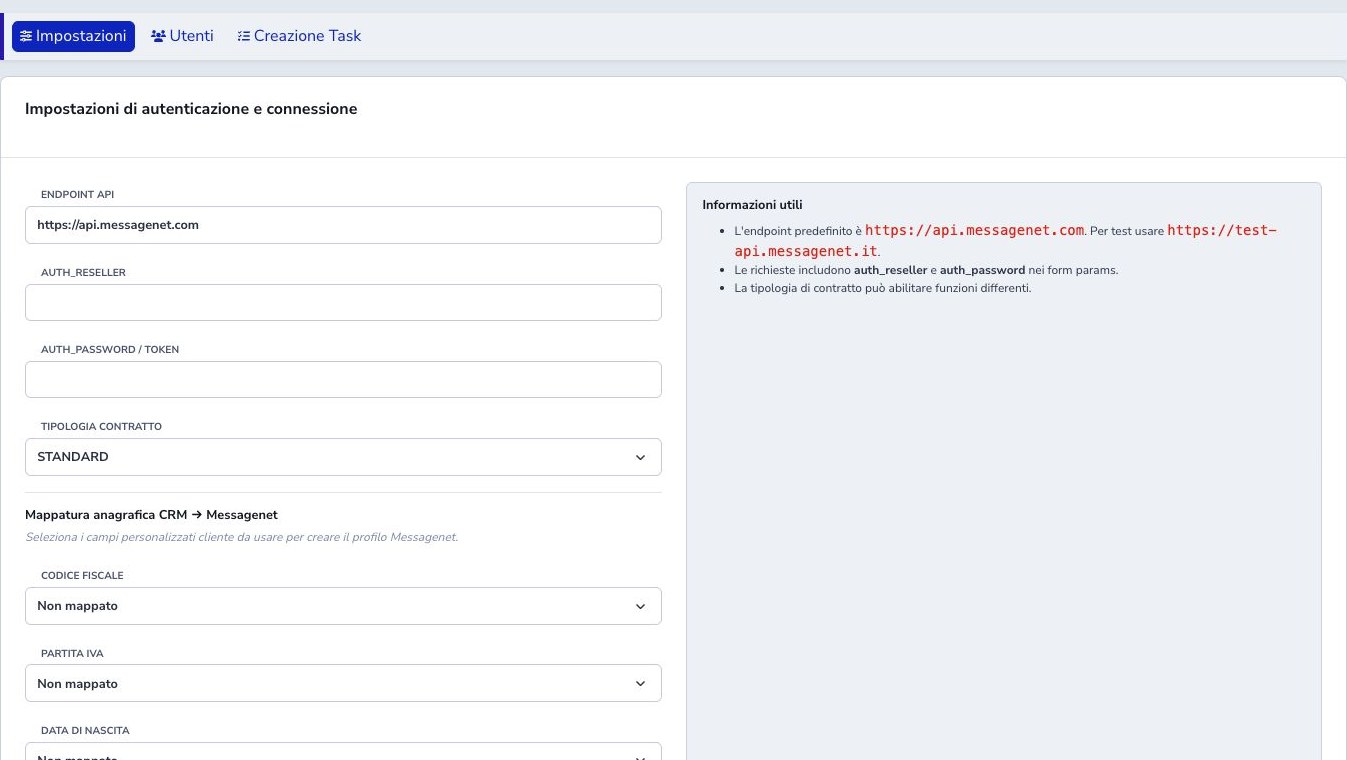
Enter the correct production or test endpoint, reseller identifier, password or token, and the actual contract type. STANDARD, Flat Bundle, NP Documents, STANDARD-PBX, and User Validation may expose different capabilities.
Save protected credentials and run Test connection before any synchronization. Confirm that the response identifies the intended reseller environment.
CRM mapping and customer eligibility
Map the CRM custom fields containing tax code, VAT number, and birth date. An unmapped field cannot be used to create the remote profile. Verify individual/company classification, account holder, and identity documents.
New-line creation is blocked for terminated customers or customers undergoing termination, even if a remote MessageNet user still exists. Do not change CRM status merely to bypass this protection.
Operational dashboard
The Dashboard summarizes profiles, documents, URI lines, and portability. In progress, Needs attention, Due today, and Expected date passed counters open MessageNet → Portability in the corresponding view.
Full case management is on the dedicated page. Open Portability to view case status and manage activities.
Portability workspace
Open MessageNet → Portability. The initial view shows open cases, prioritizing those needing attention, past expected dates, and cases due today. Upcoming, Completed, Rejected, Cancelled, and All cases views are also available.
Filter by number, customer name or code, MessageNet status, and expected-date range. Quick views clear other filters; Reset filters shows all cases. Counters cover the full local portfolio, independently of table filters. Views may overlap: a case can be due today and require documents.
Expected date passed means a case is still locally open with an expected date before today. Check the last automatic-check timestamp before treating it as an actual delay. Missing dates are not classified as overdue.
Case detail and documents
Select the number to open case details: customer, readable status, expected date, last successful check, next step, remote identifier, URI, operators, and rejection reason when available. Customer record opens the existing CRM workflow; its case link expands the matching panel.
Portability documents lists locally recorded uploads by type, filename, and date. It is not a downloadable archive and does not prove provider validation. With write permission and an open case, operators can download single-number individual/company forms, open CRM prefill, and upload signed forms, identity documents, or invoices as PDFs with the required dates.
Send to MessageNet is available while awaiting assumption of responsibility and requires confirmation. Verify documents, number, and holder before sending. No new remote cancellation or testing operations are introduced.
Refresh, dates, and permissions
Review the case status and Last updated date. Reload the page to view the latest information.
Last updated indicates how recent the displayed information is, not when the case changed status. Date added indicates when the case was registered. Status-transition history is unavailable. Completed cases remain available for consultation.
Reading requires the active module and MessageNet read permission; uploads and submission require write permission. If a case is missing, check the view, filters, and local association. If its remote identifier is missing, verify the association before sending operations. On synchronization errors, check provider configuration and permissions without resubmitting an existing request.
Synchronizing users
Sync from MessageNet retrieves provider profiles and refreshes the local cache. The process reconciles remote identifiers and missing CRM links while retaining useful local history. Review the resulting date and any profiles that remain unlinked.
Before creating a provider user, the module searches for an existing resource. If a creation response is incomplete, it attempts to recover the real remote profile. Do not repeat creation simply because a local page did not immediately show the result: search and synchronize first to avoid duplicate provider accounts.
The last-update date indicates when the local inventory was aligned. If it predates recent provider-portal operations, synchronize before treating a missing profile or stale status as authoritative.
User details and documents
The user detail combines account, profile, documents, URI lines, numbers, and NP cases. The Details buttons for VoIP lines and geographic numbers are also available for profiles not yet linked to a customer. They show information about the selected line or number; editing actions require a customer link. Existing CRM documents can be reused instead of uploaded twice. Check document type, account holder, validity, signature, and provider status; presence alone does not mean approval.
Geographic numbers and VoIP links
Search provider availability, add an appropriate geographic number, and synchronize it to a local VoIP DID. Verify district, holder, remote state, and the MessageNet block on the DID detail after linking.
Town, ISTAT code, and submission errors
In Add number, the ISTAT municipality code is filled automatically when the customer town is recognized. After editing Town / locality, the code is looked up again. If the town cannot be recognized or is ambiguous, correct the locality or enter the code manually and check that it matches.
Keep apostrophes and accents in names, company names, and addresses. For portability, a rejection shows the available reason and guidance for correcting the data. If the outcome is unavailable or unconfirmed, first check whether the case already exists at MessageNet; do not resubmit it without checking.
URI, password, forwarding, and CLI
The URI section exposes the SIP identity and supported remote controls. Depending on the contracted profile, an operator can activate the URI, change its password, configure call forwarding, and manage CLI or CLI PPI presentation.
Confirm the selected customer, URI, and requested outcome before saving. Treat SIP passwords as secrets and never reproduce them in screenshots or tickets. After a password change, update the authorized phone, ATA, or PBX and test registration plus inbound and outbound calling. For forwarding and caller ID, verify both the saved provider state and a real call scenario permitted by policy.
Credit, limits, and flat offers
Credit additions, user limits, threshold warnings, flat offers, and CAC functions are separate controls. Availability depends on the MessageNet contract type. A credit movement accepts signed quantities, including reductions, while the user limit caps usage independently.
Before a financial change, record the reason, amount, currency or unit, target user, and authorization. Then synchronize or reload the profile and compare the resulting balance and limit. Flat and CAC actions require the exact provider code, effective dates, renewal behaviour, and a check of the returned state.
Number portability
Portability management tracks the number or number range, CRM customer, holder, donating operator, migration data, documents, provider status, and important dates. Choose the correct individual, company, GNR, or multiple-number workflow before preparing the paperwork.
Validate every number, fiscal identifier, holder name, address, migration code, signature, and attachment before submission. A request accepted remotely must not be sent again merely because the local page failed to save: locate it at MessageNet and reconcile the local record.
Automatic tasks and reminders
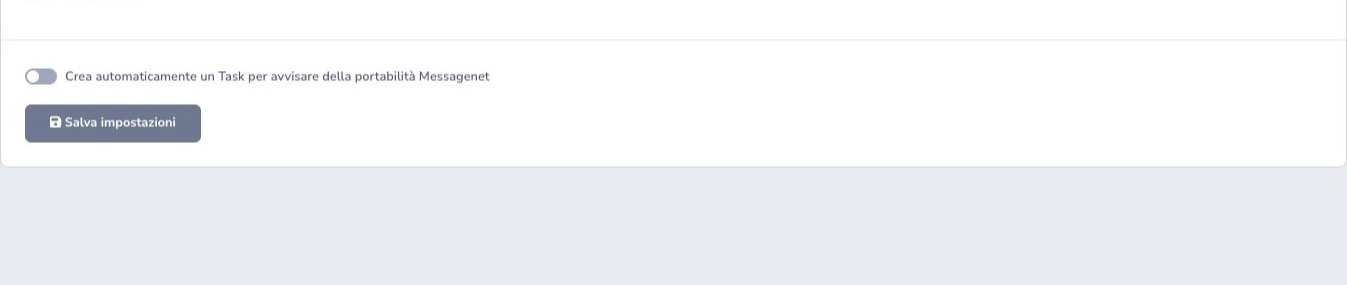
Automatic task creation translates portability events and deadlines into operational reminders. Configure it only after defining the responsible team or operator, due-date policy, priority, follow-up procedure, and the condition that closes the task.
The task is a reminder, not the provider’s authoritative status. Operators must still open the portability case, synchronize its state, review rejected or missing documentation, and record the real outcome.
CRM states and safety blocks
MessageNet actions remain tied to the CRM customer lifecycle. Creation of a new line is blocked when the customer is terminated or undergoing termination, even if a provider profile still exists. This prevents provisioning from continuing after the commercial relationship has entered closure.
Do not alter CRM state simply to bypass the block. Confirm whether the customer should be reactivated through the proper commercial process, whether an existing line only needs to be inspected, or whether the requested operation belongs to termination handling.
New-number provisioning
For a new single geographic number provide district prefix, town, address, street number, and postal code, then search or reserve. If address binding fails after reservation, correct the address and reuse the reserved number instead of consuming another one.
Verify the remote profile, synchronize the local VoIP DID, check ownership conflicts, then complete SIP provisioning, service assignment, and billing.
Portability lifecycle
Prepare the correct single, multi-number, or GNR form and verify number, migration code, fiscal identifier, holder, address, and signature. Upload the NP document, submit deliberately, use Take responsibility only for real remote ownership, and synchronize status/dates afterward.
If the remote request succeeds but local saving fails, do not submit it again; find it at the provider and reconcile the local record.
Price list, flat, CAC, and warnings
Price-list changes affect remote charging. Flat/CAC actions depend on the contracted profile and require code, dates, renewal, and resulting-state checks. Credit accepts signed quantities, including negative values; user limit remains separate. Create, attach, monitor, or remove threshold warnings deliberately.
Checklist
- Use the correct environment endpoint
- Select the contracted capability set
- Map required CRM data
- Test the connection
- Synchronize and review freshness
- Check for an existing profile before creation
- Reuse reserved numbers after address correction
- Use correct identity and NP documents
- Never resubmit an already-created remote request
- Link geographic numbers to VoIP DIDs
- Protect SIP credentials and provider tokens
- Verify price list, flat, CAC, credit, and limits
- Assign ownership for portability tasks
- Respect CRM termination states