
OTP Service: simple signatures and FEA
Configure the provider, signature types, delivery, callbacks, dossiers, and signed documents.
Last updated: 2026-08-19
Two different signature workflows
ISP Billing provides two workflows. The embedded OTP signature is the historical Customer Area flow for contracts and quotes: it sends an SMS code, records required acknowledgements, and updates the document. OTP Service is the external-provider integration for contract dossiers, simple signatures, and Advanced Electronic Signatures (FEA), including callbacks and signed-PDF acquisition.
The embedded flow requires a working SMS provider but no OTP Service account. The external flow requires the module, API credentials, provider balance, callback, complete signer data, and calibrated signature points. Do not start both workflows for the same document.
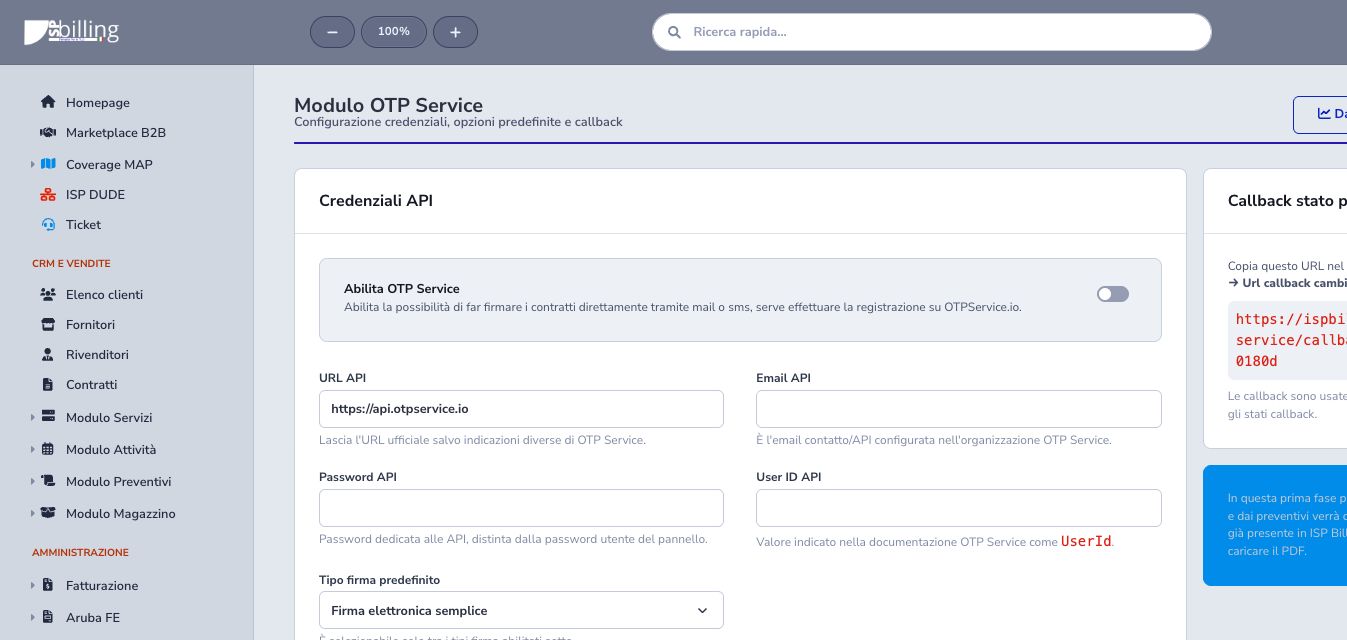
API credentials and connection test
Under Settings → OTP Service, enable the module and enter the official API URL, API contact email, dedicated API password, and numeric User ID assigned to the provider organization. Keep environment, account, and endpoint consistent; the API password may differ from the web-portal password.
Save and run Test connection. Authentication success proves reachability and credentials, but it does not prove sufficient balance, complete signer data, notification delivery, or a successful future signature.
Simple signature
Simple signature uses the provider’s acceptance and OTP process with contact information prepared from the contract customer. Enable it only when included in the provider agreement and select it as default only when it represents the ISP’s normal dossier.
Verify signer identity, email, normalized mobile number, contract, delivery choices, and signature points. OTP completion still requires review of the final signed PDF and dossier state.
Advanced Electronic Signature (FEA)
FEA requires a fuller identity dataset and the contracted recognition process with photo or identity document. Verify signer, gender, birth date and place, tax code, citizenship, residence, document type and number, issue and expiry dates, issuing country, region, and city.
Use the FEA preview to identify missing values and correct the authoritative CRM source. Never guess identity data or downgrade the signature type simply to make a dossier sendable.
FEA field mapping
Map every OTP Service identity field to either a standard customer field or a CRM custom field. Required fields cover tax code, gender, birth, citizenship, residence, document type and number, issuing place, issue date, and expiry date; in-person recognition date is an additional supported value.
Create any custom fields first, define their authoritative source and owner, then complete every required mapping. Enter the correct town and its matching province. Keep apostrophes in town names, such as Pomigliano D'Arco: there is no need to remove them to prepare the FEA preview. Use the FEA preview on the contract to inspect resolved and missing values before preparing the dossier.
Prepare a contract dossier
Open the final contract, review customer, content, service lines, attachments, and signature type, then select the OTP Service action. Preparation renders the PDF, calculates the document hash, gathers signer and contact details, and creates a local dossier in Ready to send state. An existing linked dossier is updated rather than silently duplicated.
Sending requires a CRM customer, valid email and phone, API User ID, callback configuration, and a dossier in ready_to_send or a recoverable error state. Correct the cause of an error and retry the same dossier.
Configure signature points
Insert the OTP Service signature point placeholder in the contract template, contract content, or service contractual text wherever a signature must appear. Multiple markers are supported and their order becomes the signer-point sequence.
ISP Billing renders the final PDF and calibrates page and A4 coordinates. HTML layout markers are measured directly; final-PDF calibration may use Poppler/pdftotext. If the expected and detected marker counts differ, sending stops to prevent a misplaced signature. Regenerate and inspect every PDF page after layout or service-content changes.
Delivery options
Choose whether OTP Service emails the unsigned document and whether the completed document is delivered by email or linked through SMS. If provider delivery of the initial request is disabled, the ISP must send the signing link through its own authorized channel.
Verify recipient, normalized mobile number, consent, message wording, expiry, and SMS cost. Delivery of the link is not proof that the signer viewed, accepted, or completed the dossier.
State callback
Register the unique callback URL in the correct provider organization. Its URL contains a secret and must not appear in public screenshots, tickets, or ordinary logs.
Test it with one authorized dossier, verify tenant and record association, and confirm that repeated events update the same dossier idempotently. Callback acceptance remains separate from recipient state and final document availability.
Callback matching and completion
Provider events may describe either the dossier or its recipient. ISP Billing matches them through customer dossier ID, contract hash, or remote UUID and stores dossier state, recipient state, last callback, checksum, and signed-document URL separately. Recipient viewed or signed events do not replace final dossier completion.
A contract is marked signed only after a consistent final dossier state. States that require the document must include a valid signed-PDF URL; completed may close the workflow when the file becomes available separately. Do not manually advance the contract to mask a delayed callback.
Manual state synchronization
Synchronize state reads an already-remote dossier by UUID or remote ID and applies the same mapping used by callbacks. It is appropriate when the provider portal is ahead of the local record.
Synchronization neither creates a signature request nor resends notifications. Verify dossier code, environment, and credentials before using it; a remote not-found response is not a reason to create a duplicate automatically.
Dashboard and provider credit
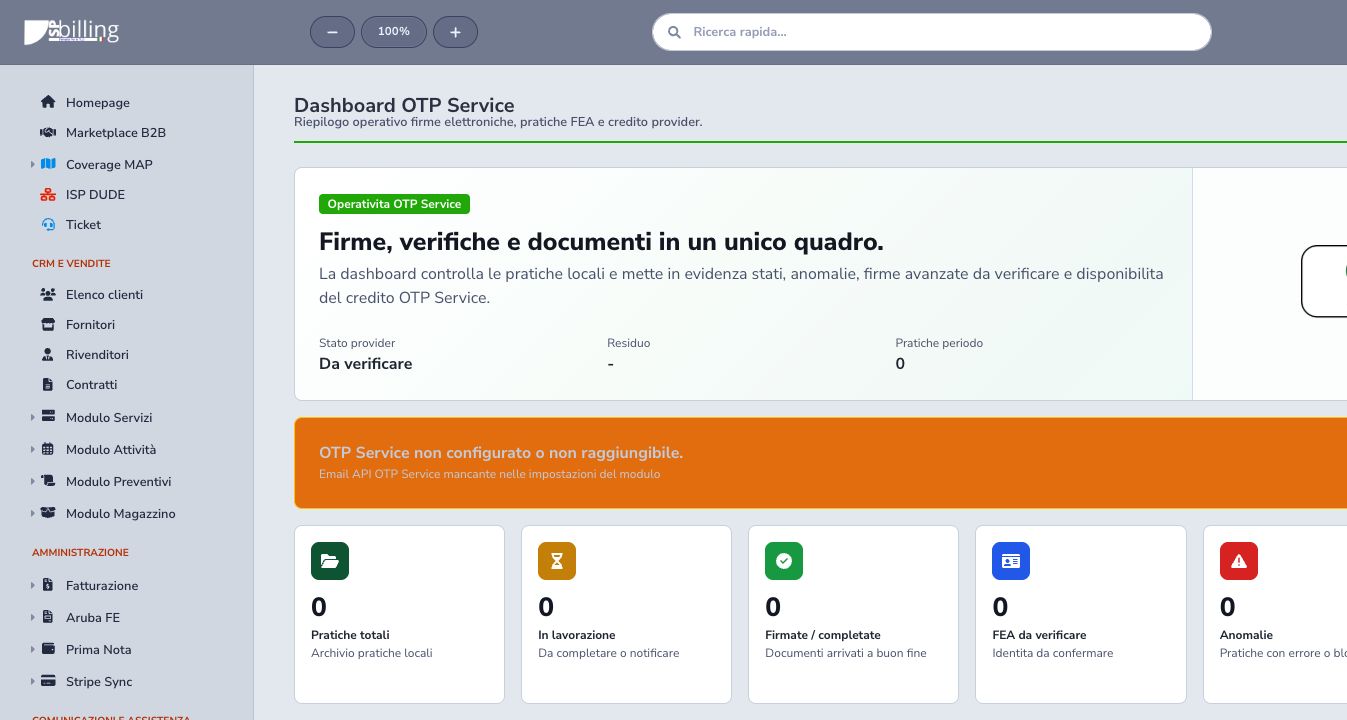
The dashboard separates provider connection state, available balance, dossier totals, in-progress and completed work, FEA verification, anomalies, sources, and recent dossiers. Connection readiness and financial capacity are distinct from contract-data quality.
Review credit before large batches and investigate connection or balance warnings before retrying failed work.
Dossier states
A dossier can move through draft, ready to send, sending, sent, notified, viewed, accepted, signing, signed, PDF generation, PDF loading or delivery, and completed, with explicit failure states.
Read recipient and dossier states separately. Correct a recoverable error and retry the same dossier; synchronize an existing remote dossier instead of duplicating its send.
Signed PDF
When a valid final PDF is available, ISP Billing stores it in the customer files, makes it visible in the Customer Area, replaces the previous contract file, records the signature date, and retains provider checksum and dossier history. Open the file and verify signer, pages, signature placement, source contract, and completeness before closure.
The remote link does not replace the ISP retention policy. File access must remain isolated by tenant, role, and customer.
Embedded OTP for contracts and quotes
The historical flow opens a protected public contract or quote link and sends a six-digit SMS code to the mobile number stored on the customer. The code is valid for one hour, resending is rate-limited to one minute, and a completed signature cannot be repeated.
Contracts also require every configured acknowledgement field; required notices cannot be declined. Confirmation records notice names and values, marks the contract Signed, sets the signature date, produces the customer PDF, and creates the configured follow-up task. Quote confirmation changes the proposal to Accepted and starts its follow-up task.
Checklist
- Choose embedded OTP or external OTP Service deliberately
- Use dedicated API credentials
- Test connectivity and provider balance
- Enable only contracted signature types
- Map all required FEA fields
- Verify email and normalized mobile number
- Place and calibrate every signature marker
- Configure delivery recipients
- Protect the callback secret
- Follow dossier and recipient states separately
- Synchronize instead of duplicating
- Verify signed PDF, checksum, source, and customer visibility