
Payment gateways: complete configuration
Configure providers, cards, SEPA, SDD, TS Pay, PAAV, and offline methods for Customer Area, invoices, and automatic collection.
Last updated: 2026-09-09
Provider versus gateway
A provider stores the technical Stripe, TS Pay, or PAAV connection. A gateway is the commercial method used by invoices, contracts, customer payment methods, and—when allowed—the Customer Area.
Configure and test the provider first, then its gateways, webhook or reconciliation process, and customer methods. Disabling a provider blocks new operations and hides its dependent gateways; PAAV outcomes already in progress continue to be reconciled.

Common gateway fields
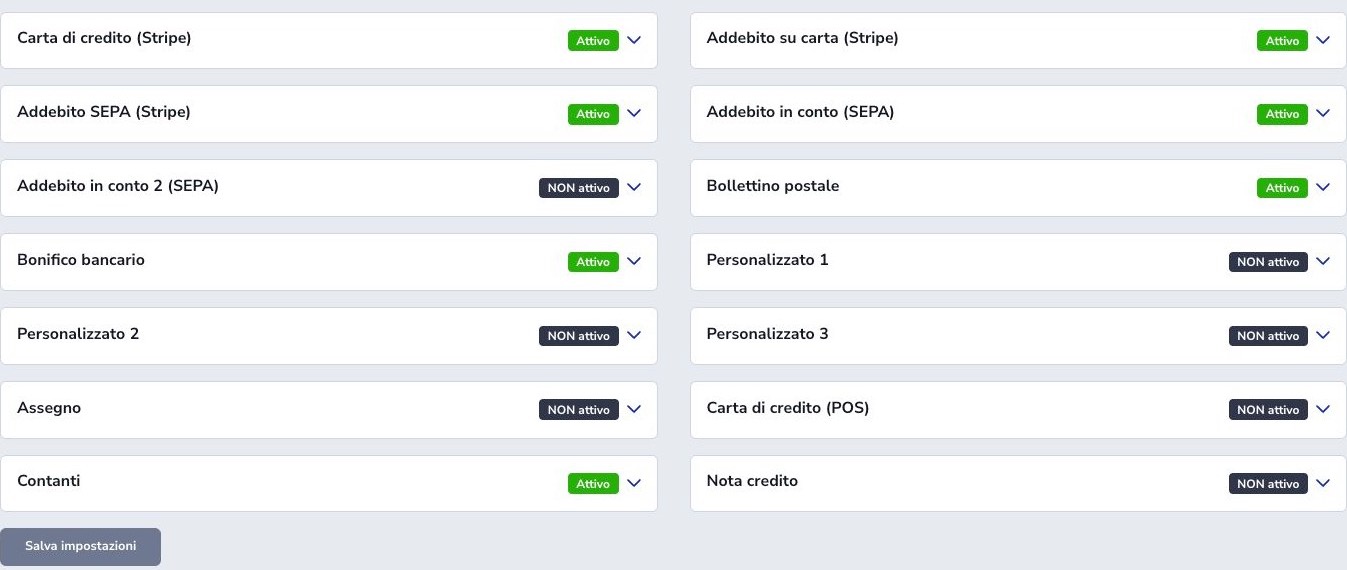
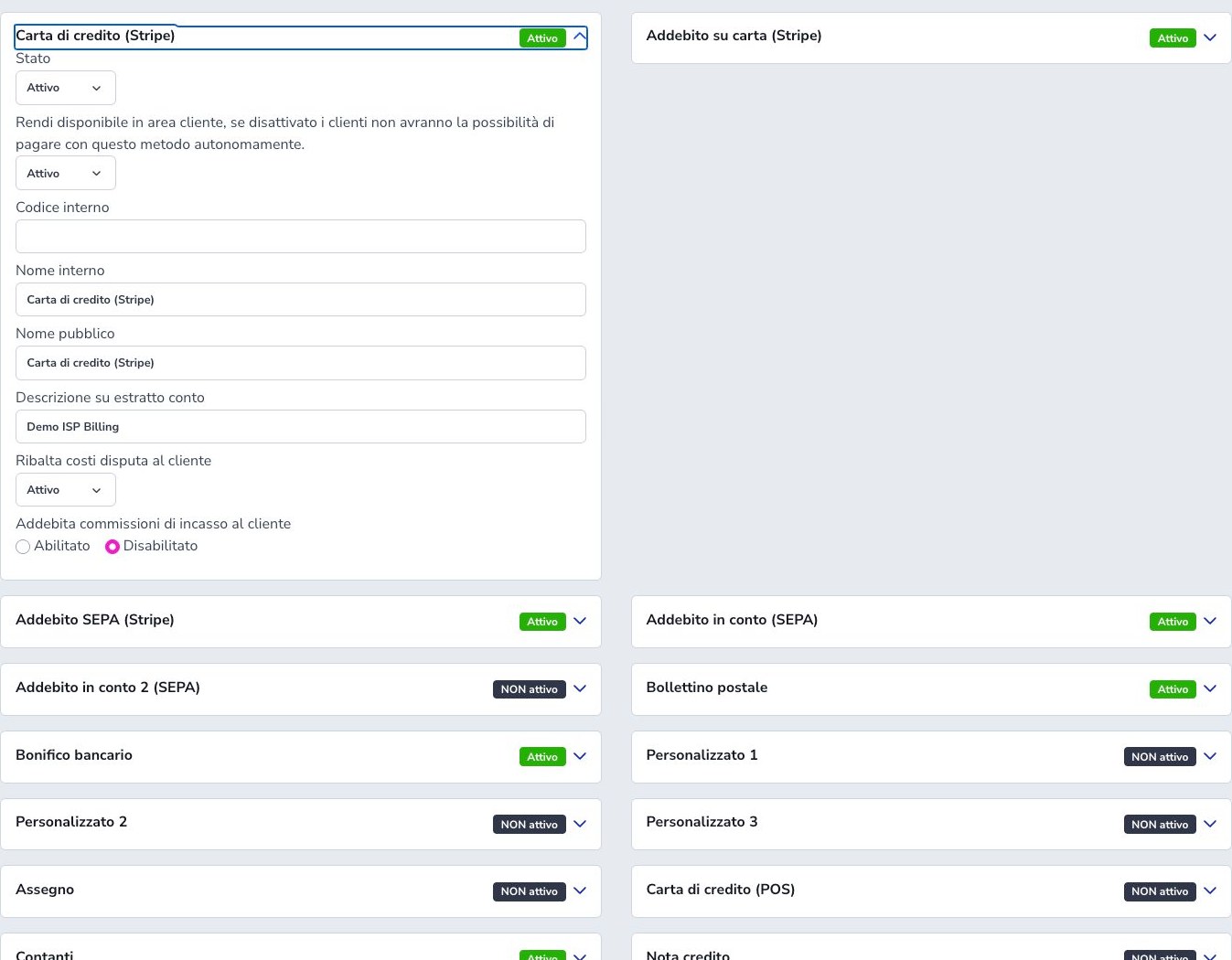
Status enables the method; internal code and name identify it in administration and integrations; the public name is shown to customers on documents and payment choices. Available in Customer Area enables self-service only for flows that actually support it and does not automatically make the method valid for every invoice or contract.
Three usage counts are always shown below each gateway name: customers using it as their default, non-terminated services configured with it, and open invoices whose status is Unpaid or Payment in progress. These values are informational and do not change customers, services, or documents.
Failed-collection fees, their VAT treatment, and fixed or percentage collection costs apply only where the selected gateway uses them. Configure values from the ISP’s contractual and accounting rules, then test the resulting document lines. Enabling a gateway does not replace provider credentials, customer authorization, webhook processing, or reconciliation.
Stripe provider and webhook
Enter the publishable key, secret key, and webhook signing secret from the same Stripe account and mode. Test keys require a test-mode endpoint and official Stripe test payment methods; production must use the matching live credentials. Mixing modes can create a checkout that cannot be reconciled by the configured webhook.
Register the tenant-specific webhook URL and subscribe to the events used for Checkout, Payment Intents, charges, refunds, and disputes. Copy the signing secret generated for that exact endpoint. Send a supported test event, check its HTTP response and ISP Billing result, and keep retry delivery enabled.
A successful browser redirect is not final proof of collection. The customer may close the page, authentication may still be pending, or an asynchronous method may later fail. Authenticated, idempotent provider events reconcile the invoice and transaction state.
Changing Stripe accounts
Saved authorizations belong to the Stripe account that created them. Inventory cards, SEPA mandates, pending charges, refunds, and webhooks before changing keys; use Reset Stripe IDs only in a planned migration.
SEPA mandates can be recreated through the supported flow, while cards require fresh customer authorization and cannot move between Stripe accounts.
Stripe customer card payment
Configure status, Customer Area visibility, names, statement descriptor, dispute handling, and collection fees. The customer starts Checkout from an invoice and may complete 3DS. Mark the invoice paid only after application/provider confirmation.
Automatic Stripe card
This gateway charges a card that the customer previously authorized for later use. The customer completes a Setup Intent through Customer Area, CRM, contract signing, or another supported flow. ISP Billing stores Stripe customer and payment-method identifiers, never the full card number or CVV.
Set the gateway as the intended automatic method only after the saved source is active and belongs to the correct customer. Authentication-required, expired, blocked, detached, or replaced cards need an explicit recovery workflow and customer communication. Verify the resulting Payment Intent and webhook before marking collection complete.
Stripe SEPA Debit
The customer authorizes an IBAN through Stripe’s supported mandate flow. Configure how many days before invoice due date collection should start, allowing enough time for the banking process and the ISP’s reminder policy.
SEPA Debit is asynchronous and can remain processing for several business days before success or failure. Keep the invoice in the appropriate pending state until the final provider event, preserve mandate evidence, and handle rejection, returned debit, or revoked authorization without creating a second uncontrolled charge.
Bulk transfer of SEPA usage
The Stripe SEPA Debit, Bank SEPA Debit, and PAAV SEPA Debit cards can separately transfer default customers, non-terminated services, and open invoices to another active gateway in this three-gateway group. Open the card, choose the record type and destination, then review the preview before confirming.
The operation changes only the gateway and preserves the saved bank method and IBAN. Records without a valid customer bank account are excluded. Invoices are also excluded when collection is suspended or a payment, instalment, capture, or PAAV order is already being processed. The operation does not disable the source gateway, include the second bank SDD gateway, or call a payment provider while changing records.
Transfer one record type at a time, read the refreshed counts after each operation, and review exclusions before making manual corrections. CRM write permission is required and the action is recorded in the account access log.
TS Pay provider
Enter the required VAT and tax identifiers, obtain or confirm the Merchant ID, then use Authorize API Key to complete the provider authorization callback. These steps establish the technical provider connection before any TS Pay gateway can operate.
Verify the active API-key state, Webhook ID, webhook secret, and the merchant identity returned by the connection. Run one controlled source-registration or payment flow and confirm the incoming status event. Protect all credentials and never simulate a provider success by changing an invoice or transaction directly in local records.
TS Pay manual and automatic methods
The manual gateway can expose card, IBAN, and PayPal in Customer Area according to its switches. TS Pay Card Auto and IBAN Auto use saved authorized sources; verify source activation before collection. Disabling one manual option does not delete existing saved methods.
PAAV provider and automatic SEPA Debit
PAAV is a business payment-services ecosystem created from Stantup Service’s experience. The ISP Billing integration manages SEPA Direct Debit mandates and payment orders through PAAV. Payment services are provided through Treezor SAS; PAAV acts as an authorized agent and is not a bank.
Under Payment providers → PAAV, select Enabled and enter the Client ID, Client secret, and Base URL for the correct environment, then configure the PAAV SEPA Auto gateway. The advance period cannot be shorter than four days. Automatic orders are submitted with the configured advance period and keep the due date as their scheduled payment date. If a manual capture or a document close to its due date does not provide the full notice period, the scheduled payment date is moved forward to guarantee it. A payment is recorded only once it is completed. Later reversals and outcomes of previously submitted orders continue to be detected if the provider is subsequently disabled. When a failed or cancelled debit is detected, the invoice displays the outcome and, when available, the code and reason supplied by PAAV, with the update date. The failed collection also appears in Error logs and the dashboard alert; collection remains suspended. Check and resolve the reported cause before using Enable collection or Capture payment.
Disabling PAAV prevents new orders and hides its gateway from configuration without deleting credentials, mandates, or history. For commercial and service information, see the official PAAV website.
PAAV mandate: details, signature date and status
Enter the bank-provided code in BIC / SWIFT. The account can also be saved without it: when a new PAAV mandate is needed, ISP Billing attempts to retrieve the code and saves it on the account for future use. Retrieval is unnecessary when a usable mandate or a BIC is already available. If a waiting message appears, retry capture shortly; if retrieval fails, enter the BIC manually. Retrieving the BIC does not confirm a successful payment.
The IBAN cannot be changed after saving. To change accounts, create a new payment method, update linked services and invoices, then remove the previous method when allowed. Links to services or open documents may prevent removal.
Before the first debit, complete the saved bank account with the holder, IBAN, address and actual acceptance date; also check the tax code or VAT number. The signature date sent to PAAV comes from the acceptance date saved on the account, so it may predate registration in PAAV. A missing, invalid or future date must be corrected; it is not replaced with today’s date.
A retrieved mandate must match the account and selected SEPA type. If it is closed, revoked, incompatible or has an unrecognised status, the request is stopped and an error is shown. The Mandates list displays the last saved status, which may differ from the current status in PAAV. A pending status does not prove that the mandate is absent and does not guarantee successful collection.
If PAAV reports No mandate, check both the mandate and the transaction details, and give PAAV support the outcome code and reason. The mandate appearing in the list does not, by itself, explain the rejection. Confirm the conditions for reusing a previous mandate with PAAV before repeating the payment. Outcomes recorded before this update may contain only a generic description: reasons that were not previously retained are not reconstructed.
Bank SDD gateways
Bank SEPA Direct Debit generates the files delivered through the ISP’s banking process rather than calling Stripe. Configure Creditor ID, VAT number, creditor legal name and IBAN, SIA or BIC information, ABI, mandate prefix, collection lead time, failed-collection cost, and its VAT treatment.
Collect and retain a valid mandate for the exact customer and account. Use the B2B scheme only for eligible business debtors and banking arrangements. Decide how first and recurrent collections are separated and verify the generated file with the bank’s validation procedure before production.
The FRST separation and mandate-prefix settings are shared across the two SDD gateway variants, so changing one can affect both. Reconcile submitted files, accepted or rejected entries, actual bank outcomes, invoices, and any failed-collection fee.
Postal payment
Configure instructions, business name, postal account, IBAN, and print authorization code. Automatic PDF generation requires all fields and applies the per-document cost shown in the interface. Payment still requires reconciliation.
Bank transfer and offline methods
Bank transfer exposes IBAN and instructions. Three custom offline gateways can represent ISP-specific methods. Cheque, offline POS, cash, and credit note are manual channels without webhook confirmation; record date, amount, reference, and operator.
Reseller credit ceiling
The reseller plafond gateway is restricted to reseller-area workflows and consumes the assigned credit ceiling; it is not a general customer-facing method. Configure relationship, limits, movements, and permissions first, and reconcile every use with its order, document, and plafond movement.
Customer payment methods
CRM and Customer Area can register or display Stripe cards and bank mandates, TS Pay card or IBAN sources, and supported manual bank accounts according to the active provider and gateway. Each method must belong to the correct customer and retain the provider identifiers needed for later use.
A default method may drive contract choices and automatic collection, so changing it has consequences beyond the profile screen. Verify active state, authorization, masked description, expiry where relevant, and which services or contracts use it. Never place PAN, CVV, API credentials, or reusable banking secrets in CRM custom fields, notes, or messages.
Refunds, disputes, and idempotency
Stripe events cover completed Checkout sessions, Payment Intent transitions, successful or failed charges, paid provider invoices, refunds, and dispute outcomes; TS Pay reports its source and charge states. Verify each webhook signature and use the stable provider event or transaction identifier so a repeated delivery cannot apply the same accounting change twice.
A refund does not erase the original invoice or collection. Record the returned amount, provider reference, reason, date, and the accounting document or adjustment required by policy. A dispute may move through several stages, so distinguish its opening, evidence, closure, and financial result rather than treating the first event as final.
Customer Area and rechargeable services
Only gateways that are active, compatible with the current document, and explicitly available to customers appear in the Customer Area. Test the full path from authenticated invoice selection through provider checkout, return page, webhook, invoice state, receipt, and payment history.
The Pay now link follows the gateway already assigned to the invoice. With Stripe credit card or TS Pay, it opens the provider checkout directly. With a different method, it opens the protected Customer Area payment page, so a customer who is not already authenticated must sign in. The link does not automatically choose a different card gateway from the one assigned to the document.
For a rechargeable service, the customer pays the generated recharge invoice with an eligible gateway. Only successful collection through the normal payment event advances the service period or available validity. Leave the service unchanged while the transaction is pending, failed, cancelled, or disputed; do not manually edit expiry to imitate a successful recharge.
Checklist
- Configure the provider first
- Keep credentials in one environment
- Register and verify webhooks
- Enable only used gateways
- Set public names and instructions
- Decide Customer Area visibility
- Configure disputes and fees
- Obtain consent for saved methods
- Wait for asynchronous outcomes
- Configure SDD mandates correctly
- Reconcile offline methods
- Never store sensitive card data
- Verify refunds and disputes
- Check rechargeable renewal