
Requirements: Internet transparency, deadlines, AGCOM/FUB, and Telephone Tax Registry
Internet technology disclosure, reminders, access line classification, and telephone records preparation.
Last updated: 2026-09-07
Internet technology transparency: what to do below 50,000 customers
Open Requirements → Internet technology transparency → Read what to do. The guide uses an example to explain why customers must be able to learn about every technology available at their address and its performance before choosing, including technologies their ISP does not sell. It does not require selling a different technology.
Below 50,000 customers, prominently display a link to the AGCOM Broadband Map on coverage and offer selection pages before contract conclusion. Make it available through sales staff, customer care and shops used for sales. The guide provides ready-to-use website wording; opening the guide does not publish it on the website. Importing maps or building an address search is not required for this route.
No notification of completed implementation to AGCOM is prescribed for this specific obligation. Keeping screenshots, page addresses, dates and sales instructions is a recommended documentary precaution: retain these in your own records. A screenshot only records the page at capture time. Check mobile visibility and recheck the link after website changes. Customer portals, apps, news and invoices provide additional visibility but do not replace disclosure during offer selection.
At 50,000 customers or more, additional obligations apply: a link alone is insufficient and the ISP should consult its adviser. The AGCOM circular of 3 July 2026 identifies 20 June 2026 as the start of the penalty regime.
Purpose and preparation
Requirements converts information already stored in CRM, services, VoIP, contracts, and billing into operational checks and working files. It does not decide whether an obligation applies and does not replace legal or accounting review.
Before starting, identify the obligation, reference period, population, official format, deadline, responsible operator, approver, and authorized delivery channel. Correct source records first: an export must never become the place where customer or service data is silently repaired.
Deadlines, calendar, and status
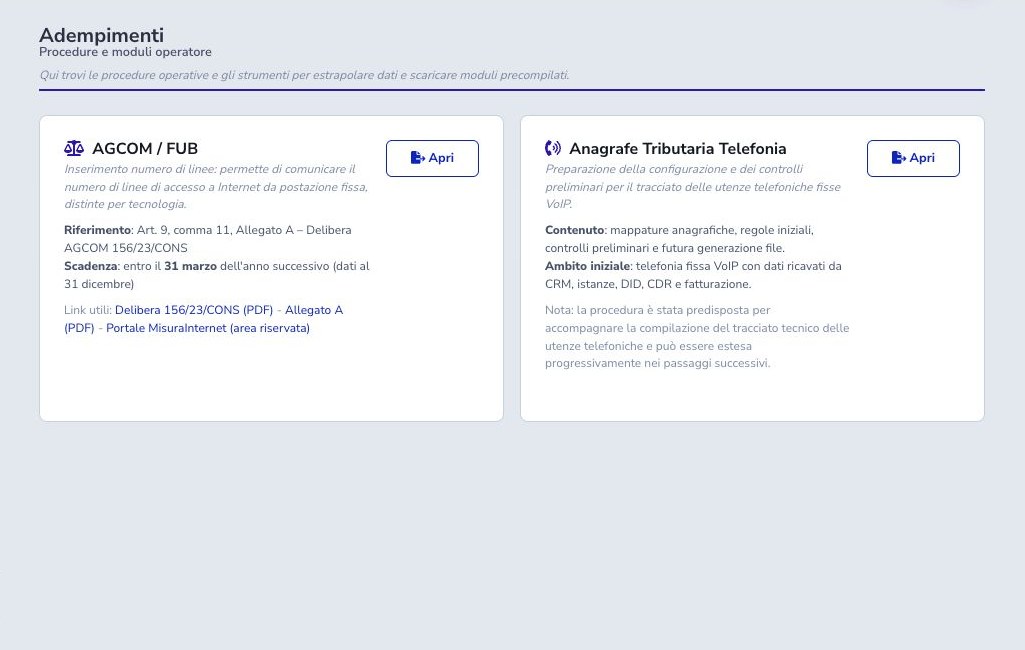
The dashboard separates upcoming, overdue, completed, and not-relevant items. Open each entry to review description, period, due date, and linked workflow. Mark Done only after completing the activity and retaining its evidence.
Not relevant is an explicit scope decision, not a way to hide an overdue task. Record the reason in the ISP’s governance process and review it when products, customer base, or regulations change.
Reminders
Configure a reminder date and a monitored recipient before the operational deadline. Verify SMTP selection, sender authorization, template, timezone, and actual delivery. A scheduled job may prove that a message was queued or accepted, but not that the responsible person read it.
Keep an independent compliance calendar and escalation owner. Avoid using a single mailbox as the only control for a statutory deadline.
AGCOM/FUB: required setup
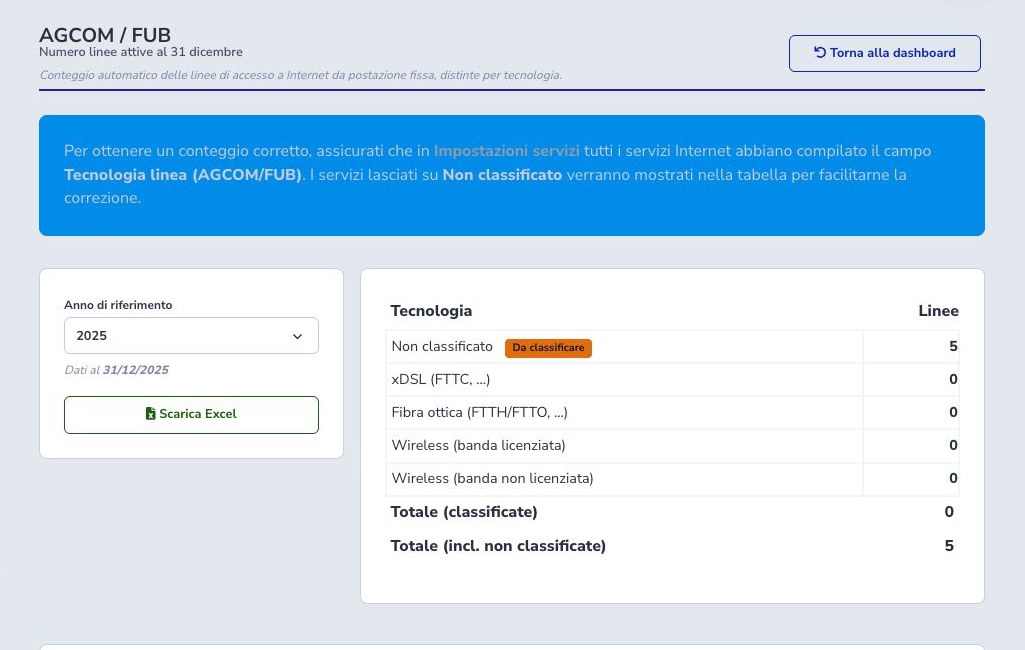
In Service settings classify every Internet catalog offer with its AGCOM/FUB access technology. Use the classification that represents the delivered line, not the commercial product name. Review bundles and legacy offers as well as currently sold products.
Complete this mapping before opening the annual count. Every Unclassified row identifies source data that must be corrected; assigning a technology only in a spreadsheet would make the next extraction inconsistent.
AGCOM/FUB: count and Excel review
Select the reference year. The workflow evaluates service lifecycle at 31 December, including activation and termination dates, and applies the service quantity where required. Reconcile totals with the service inventory and investigate unexpected variations from the prior period.
Export the Excel file only after resolving unclassified services. Check technology columns, totals, reference year, duplicates, excluded records, and rounding before approval.
Telephone Tax Registry: source data
The fixed-telephony workflow combines CRM customers, tax and address data, customer custom fields, contracts, VoIP service instances, assigned DIDs, offers, activation dates, and billing information. Each record must refer to the actual account holder and active numbering relationship.
Before extraction, reconcile duplicate customers, shared Customer Area accounts, additional addresses, transferred numbers, ceased services, and number ranges. A DID present in inventory is not sufficient unless ownership and service linkage are correct.
VoIP and billing mappings
In VoIP settings map the CRM fields used for gender, birth date, municipality of birth, and province of birth. In billing settings map the fields used for tax code and VAT number. Choose stable fields with consistent formats and verify that the same meaning is not spread across several custom fields.
Changing a mapping affects the next validation and generation. Review existing values, API imports, registration forms, and contract wizards before replacing it.
Derived rules and multiple users
Some output values are derived from customer type, fiscal identifiers, address, contract, service, and numbering relationships. Check individuals and organizations separately, including foreign data and records with several lines or service users.
Where the operating model distinguishes account holder and effective user, make the relationship explicit in the supported source fields. Do not duplicate an identity merely to make a validation warning disappear.
General validation and anomalies
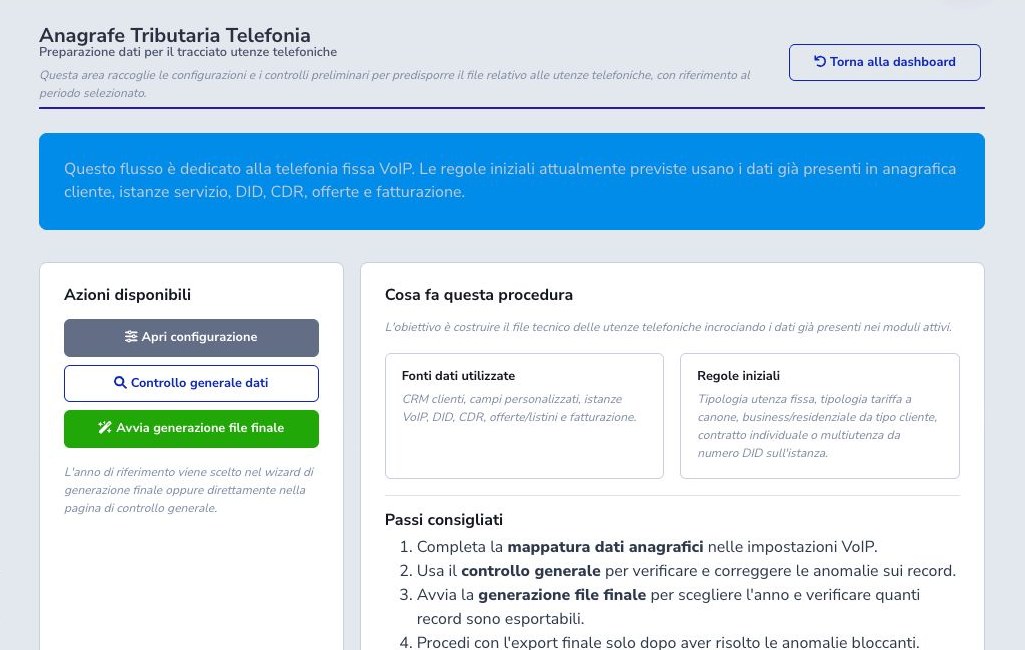
Run the general preview before final generation. It reports missing DID, activation, address, contract, fiscal identifier, municipality code, mapping, gender, birth information, and other blocking inconsistencies. Open the affected customer or service and correct the authoritative record.
Repeat validation until the same population is clean. Preserve the before/after counts and have an authorized operator review exclusions; absence of a technical error is not by itself approval to transmit.
Final generation
In the final wizard choose the year and complete the intermediary and commitment information required by the operational case, including tax identifier, any CAF number, commitment type, and date. Run precheck and compare eligible and blocked records before starting.
Generation runs in the background. A temporary entry means processing is still underway; do not start duplicate jobs. When complete, download the file, verify its checksum or controlled copy, record version and approver, and retain the submission receipt.
Security and final checklist
The generated files contain identity, tax, contract, address, and telephone information. Restrict access and retention, avoid ordinary support tickets, and transfer them only through the authorized channel.
- Confirm scope, period, and deadline
- Classify every Internet service
- Resolve every AGCOM/FUB unclassified row
- Map VoIP and fiscal fields
- Verify customers, contracts, addresses, and DIDs
- Correct anomalies at source
- Validate intermediary data
- Wait for background completion
- Protect files and receipts
- Obtain approval before transmission