
Minute-based support packages
Define time packages, enable them per customer, record credits and usage, and preserve an auditable balance.
Last updated: 2026-08-19
Operational model
Minute-based support separates the commercial package catalog from each customer’s available balance. A package defines what can be purchased or credited; customer movements create the real balance by adding or consuming minutes.
The feature is suitable for prepaid technical support or time allowances. It does not automatically measure calls or activities, so operators must record consumption from verified work and use consistent rounding and evidence rules.
Package configuration
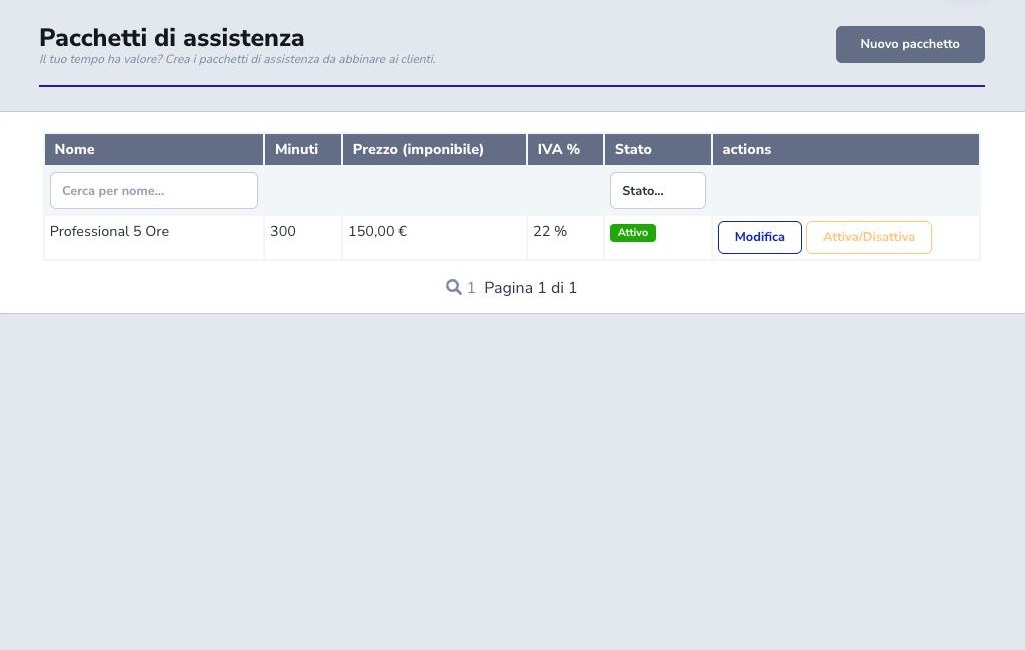
Create each package with a clear customer-facing name, whole-minute quantity, net price, VAT rate, and active or inactive state. Confirm the gross result and whether the package is a standard sale, a contractual allowance, or an internal option.
Deactivating a package prevents future selection without erasing existing customer movements. Before changing minutes, price, or VAT, consider already communicated offers and use a new package when historical meaning must remain stable.
Enable the customer
Open the correct CRM customer and enable Minute Support before recording operations. Verify customer identity, contract or commercial agreement, responsible team, and who may see or modify the balance.
Enabling the feature does not credit minutes by itself. It exposes the customer ledger and permitted actions; the initial balance remains determined by explicit movements.
Credit minutes
Credit a configured package when the customer purchases or receives that offer. The movement should retain the package reference, credited quantity, date, operator, and a note identifying the invoice, contract, promotion, or approved goodwill.
Use a manual positive adjustment only when no catalog package correctly represents the reason. State the quantity and authorization clearly so later reconciliation can distinguish revenue, included allowance, goodwill, and correction.
Consume minutes
Debit only time actually delivered under the agreed rounding policy. Enter the consumed minutes and describe the ticket, activity, call, remote session, or field intervention that supports the charge.
Check the available balance before saving and tell the customer when policy requires it. Do not conceal an overrun through an unexplained correction; decide whether excess time is billed separately, authorized as goodwill, or held for review.
History, corrections, and permissions
The ledger shows credits, debits, package reference, operator, date, note, and resulting balance. Reconcile movement totals with the customer’s commercial documents and operational evidence, especially after manual adjustments.
Deleting a movement changes the historical balance and is an accounting correction, not ordinary editing. Restrict create and delete permissions, document the reason and authorization, and prefer an explicit counter-movement when the ISP’s audit policy requires the original entry to remain visible.
Checklist
- Validate VAT
- Define package minutes and price
- Enable the correct customer
- Separate purchase, goodwill, and correction
- Describe every usage
- Link operational evidence
- Reconcile balance and totals
- Restrict deletion rights