
System settings and modules
Navigate general settings, communication providers, licensing, and the ISP module catalogue.
Last updated: 2026-09-11
Purpose of System settings
System settings is the entry point for tenant-wide configuration and module-specific settings. Open it from the gear icon in the top bar.
It is an operational catalogue rather than one large form. Quick links lead to general settings, Edge Agent, SMTP, WhatsApp, and SMS providers, while module cards open each module’s configuration.
Before changing configuration
Changes may affect every operator and customer in the tenant. Identify the environment, module, required permission, and dependent workflows before saving.
Credentials, tokens, API keys, SMTP passwords, and gateway secrets must never appear in public screenshots or examples.
General quick links
- General: ISP identity and general behaviour.
- Edge Agent: connection to remote resources or networks.
- SMTP gateway: accounts used for outgoing email.
- WhatsApp provider: provider and channel profiles.
- SMS provider: provider used for text messages.
A dashboard SMTP warning may link directly to the SMTP gateway. Correcting configuration and dismissing the warning are separate actions.
Licence and availability
The page displays the current licence and available upgrades. The example tenant reports FREE 100. Licence limits, user permissions, and module activation are separate controls.
Request upgrade starts a commercial workflow and must not be used merely to bypass a limitation during testing.
Search and category filters
Search module filters cards by name. Category buttons cover CRM and Sales, Administration, Communications and Support, Telecommunications, Network Management, and Utilities.
Each category separates active modules, inactive modules, and any Coming soon modules. Counts describe the current tenant, not every source module.
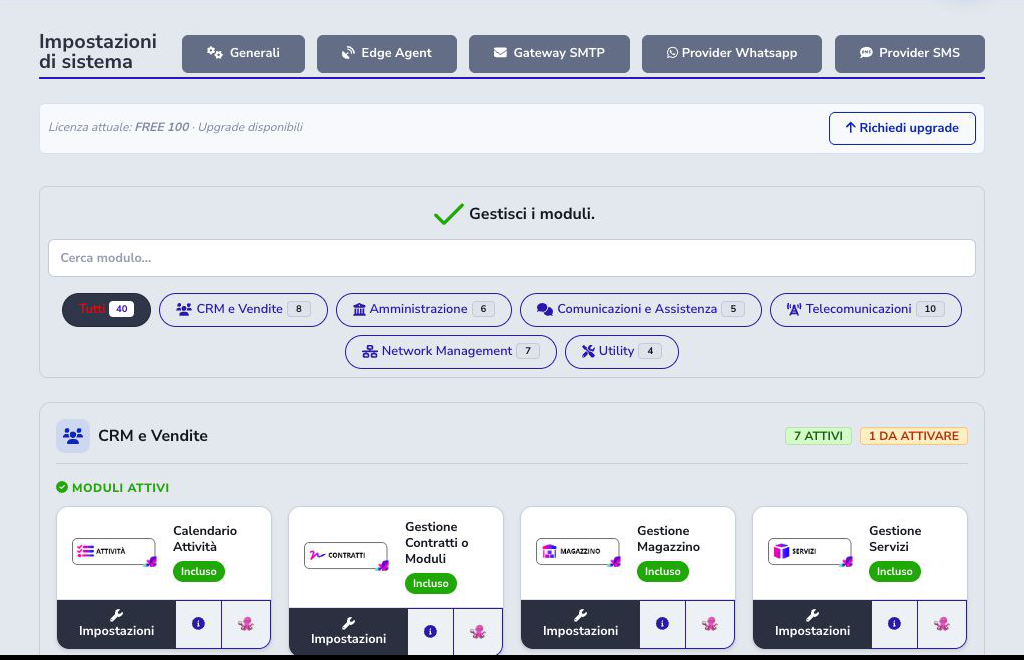
Read a module card
A card shows the public module name, commercial availability, and actions. Labels include Included, Free, a monthly price, and Coming soon. They do not prove that external accounts or dependencies are configured.
An active module exposes Settings. Paid inactive modules keep Request activation; modules explicitly priced at €0/month show Activate module and can be enabled immediately by a full administrator. A Coming soon module is still being prepared: its card only opens the available module information and does not allow activation or an activation request.
Try and deactivate a free module
A full administrator can activate a €0/month module, open its settings, and test it without submitting a commercial request. Module activation adds no monthly subscription charge and requires no associated billing product; external provider accounts, infrastructure, or usage-based costs remain separate and are explained in the module guide.
If the module is not suitable, use Deactivate on the same card. Access is removed while data and configuration are preserved for a later reactivation. Only a full administrator can perform the action, and it is recorded in the system log.
Observed CRM and administration modules
The example has Activities, Contracts, Warehouse, Services, CRM, Quotes, and Resellers active; Wholesale is inactive.
Payment gateways, Administration, Billing, OTP Service, Aruba electronic invoicing, and Stripe Sync Subscriptions are active. Each requires its own detailed guide.
Observed communications and telecom modules
Tickets, Communications, and Support Time Packs are active; Mail2Wa and Qboxmail are inactive. MessageNet, VoIP, and ISP Radius 2.0 are active, while several external carrier and Radius integrations are available for activation.
Commercial activation does not replace provider configuration. Accounts, endpoints, permissions, and synchronization require separate verification.
Network, coverage, and infrastructure
IPv4/VLAN management, Coverage Map, ISP Dude, cnMaestro, UISP, Proxmox, and Optiwize serve different purposes: logical inventory, commercial availability, monitoring, device control, and virtualization. Their guides identify the authoritative system for each data set and explain how to prevent overlap.
Integrations require coherent controllers, devices, or external services. When an end-to-end test is not possible, the manual still documents configuration and behavior from the implementation without presenting example conditions as customer-facing product information.
Operational checklist
- Open Settings from the top-bar gear
- Identify the correct category and module
- Check licence, activation, and permissions separately
- Read module information and prerequisites
- For a €0/month module, use Activate module and complete configuration
- Open Settings only for an active module
- Check active processes before deactivation
- Never publish credentials or keys
- Save one change at a time
- Verify its effect in the related workflow
- Record anomalies without changing code